helloWorld
print('Hello World')
Python基础语法
注释
单行注释用 # 号
多行注释用 ”’ ”’ 或者 """ """
# 这是一个注释 单行注释

'''
这是多行注释,用三个单引号
这是多行注释,用三个单引号
这是多行注释,用三个单引号
'''

"""
这是多行注释(字符串),用三个双引号
这是多行注释(字符串),用三个双引号
这是多行注释(字符串),用三个双引号
"""
缩进
python里缩进表示一个代码块,并且是强制这么做.而不是像其它语言里用大括号
if 5 > 2:
  print("Five is greater than two!")

if True:
    print ("True")
else:
    print ("False")
引号
使用引号( ‘ )、双引号( " )、三引号( ”’ 或 """ ) 来表示字符串 其中只有三引号可以表示多行
word = 'word'
sentence = "这是一个句子。"
paragraph = """这是一个段落。
这是一个段落,
包含了多个语句"""
同一行可以写多条语句 要用;隔开
import sys; x = 'runoob'; sys.stdout.write(x + '\n')
python变量
python是弱类型语言 声明的时候不需要类型
x = 10
y = "Bill"
print(x)
print(y)
#语法 比较灵活 一行声明多个变量
x, y, z = "Orange", "Banana", "Cherry"
print(x)
print(y)
print(z)

#也可以在一行中为多个变量 赋相同的值
x = y = z = "Orange"
print(x)
print(y)
print(z)
变量输出
# + 号可以用来连接字符串
x = "awesome"
print("Python is " + x)

x = "Python is "
y = "awesome"
z =  x + y
print(z)

#对于数字 + 号作为数学运算符
x = 5
y = 10
print(x + y)

#注意 不允许以下这样 会报错 让数字与字符 做 + 运行
x = 10
y = "Bill"
print(x + y)

#函数外部创建变量 并在函数内部使用它
#函数外部创建的变量 看起来像全局变量
x = "awesome"
def myfunc():
  print("Python is " + x)
myfunc()

#注意:如果函数内部有重名变量 外部变量将被覆盖
x = "awesome"
def myfunc():
  x = "fantastic"
  print("Python is " + x)
myfunc()
print("Python is " + x)

#函数内部创建的变量 仅仅只是局部变量 如果想全局使用 需要global
def myfunc():
  global x
  x = "fantastic"
myfunc()
print("Python is " + x)

#在函数内部更改全局变量的值 需要global
x = "awesome"
def myfunc():
  global x
  x = "fantastic"
myfunc()
print("Python is " + x)
python中的数据类型
默认拥有以下数据类型
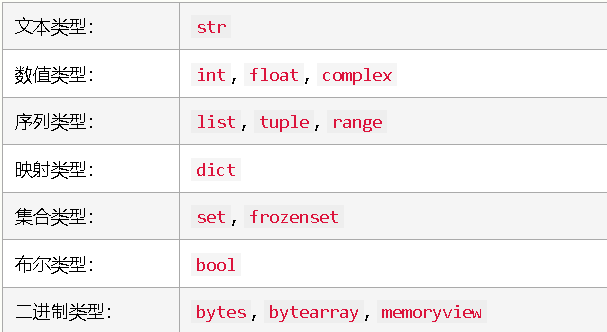
#打印一个变量的数据类型
x = 10
print(type(x))

#在 Python 中,当您为变量赋值时,会设置数据类型:
x = "Hello World"  #str
x = 29  #int
x = 29.5  #float
x = 1j  #complex
x = ["apple", "banana", "cherry"]  #list
x = ("apple", "banana", "cherry")  #tuple
x = range(6)  #range
x = {"name" : "Bill", "age" : 63}  #dict
x = {"apple", "banana", "cherry"}  #set
x = frozenset({"apple", "banana", "cherry"})  #frozenset
x = True  #bool
x = b"Hello"  #bytes
x = bytearray(5)  #bytearray
x = memoryview(bytes(5))  #memoryview
数据类型 数字
#Python 中有三种数字类型:int float complex
x = 10   # int
y = 6.3  # float
z = 2j   # complex
print(type(x))
print(type(y))
print(type(z))

#类型转换
#可以使用 int()、float() 和 complex() 方法从一种类型转换为另一种类型:
x = 10 # int
y = 6.3 # float
z = 1j # complex
# 把整数转换为浮点数
a = float(x)
# 把浮点数转换为整数
b = int(y)
# 把整数转换为复数:
c = complex(x)
print(a)
print(b)
print(c)
print(type(a))
print(type(b))
print(type(c))

#随机数 需要用到 random 模块
#1 到 9 之间的随机数:
import random
print(random.randrange(1,10))

#数字与字符串之间的转换
x = int(1)   # x 将是 1
y = int(2.5) # y 将是 2
z = int("3") # z 将是 3

x = float(1)     # x 将是 1.0
y = float(2.5)   # y 将是 2.5
z = float("3")   # z 将是 3.0
w = float("4.6") # w 将是 4.6

x = str("S2") # x 将是 'S2'
y = str(3)    # y 将是 '3'
z = str(4.0)  # z 将是 '4.0'
字符串
#字符串定义
#可以由 单引号 ' ' ,双引号 " " , 三个单引号 ''' ''', 三个双引号 """ """ 来定义
a = "Hello"

a = 'Hello'

a = '''Python is a widely used general-purpose, high level programming language.
and its syntax allows programmers to express concepts in fewer lines of code.'''

a = """Python is a widely used general-purpose, high level programming language.
and its syntax allows programmers to express concepts in fewer lines of code."""

#字符串可以像数组那样通过下标取值
a = "Hello, World!"
print(a[1])

#也可以像数组那样取多个值
b = "Hello, World!"
print(b[2:5])
#从末尾开始数
b = "Hello, World!"
print(b[-5:-2])

#字符串长度 len()
a = "Hello, World!"
print(len(a))

#字符串 strip() 清除掉左右空白 PHP里的trim
a = " Hello, World! "
print(a.strip()) # returns "Hello, World!"

#lower() 返回小写的字符串:
a = "Hello, World!"
print(a.lower())

#upper() 方法返回大写的字符串:
a = "Hello, World!"
print(a.upper())

#replace() 用另一段字符串来替换字符串:
a = "Hello, World!"
print(a.replace("World", "Kitty"))

#split() 用分割符切割字符串,返回List
a = "Hello, World!"
print(a.split(",")) # returns ['Hello', ' World!']

#检查以下文本中是否存在短语 "jap":
txt = "japan is a great country"
x = "jap" in txt
print(x)

#检查以下文本中是否没有短语 "jap":
txt = "japan is a great country"
x = "jap" not in txt
print(x)

#字符串连接
a = "Hello"
b = "World"
c = a + b
print(c)

a = "Hello"
b = "World"
c = a + " " + b
print(c)

#format() 方法组合字符串和数字
age = 63
txt = "My name is Bill, and I am {}"
print(txt.format(age))

quantity = 3
itemno = 567
price = 49.95
myorder = "I want {} pieces of item {} for {} dollars."
print(myorder.format(quantity, itemno, price))

#使用索引号 {0} 来确保参数被放在正确的占位符中
quantity = 3
itemno = 567
price = 49.95
myorder = "I want to pay {2} dollars for {0} pieces of item {1}."
print(myorder.format(quantity, itemno, price))
Python 布尔
布尔表示两值之一:True 或 False。
print(8 > 7)
print(8 == 7)
print(8 < 7)

a = 200
b = 33
if b > a:
  print("b is greater than a")
else:
  print("b is not greater than a")

#数字和字符串可以转换成布尔
print(bool("Hello"))
print(bool(10))
bool(["apple", "cherry", "banana"])

x = "Hello"
y = 10
print(bool(x))
print(bool(y))

#注意 下例会返回 False:
#False None 0 空字符 空元组 空列表 空字典
bool(False)
bool(None)
bool(0)
bool("")
bool(())
bool([])
bool({})

#这种情况也为False
class myclass():
  def __len__(self):
    return 0
myobj = myclass()
print(bool(myobj))

#函数返回布尔值
x = 200
print(isinstance(x, int))
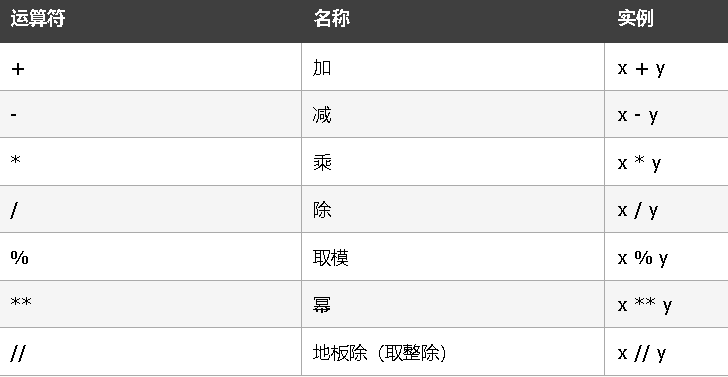
运算符
Python 算术运算符
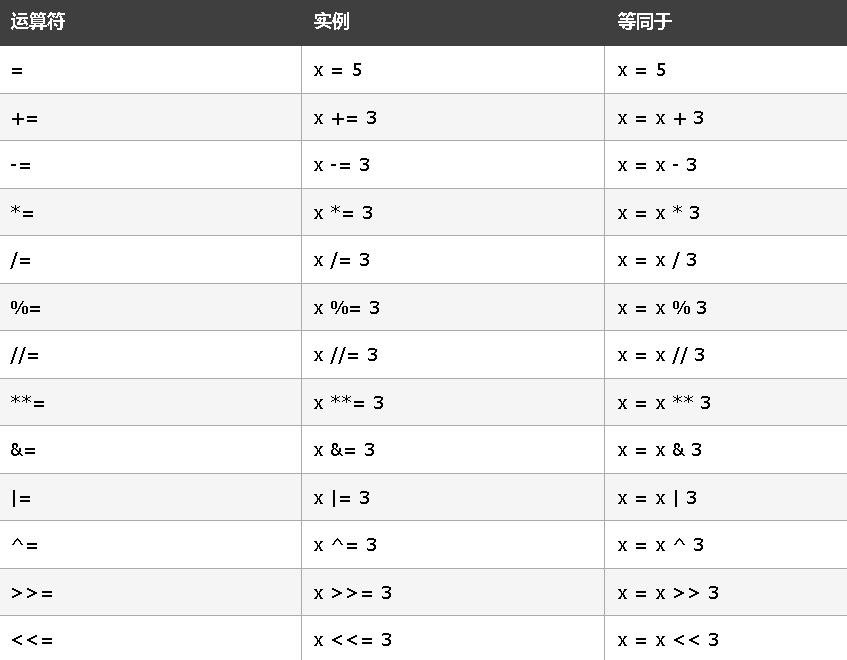
Python 赋值运算符
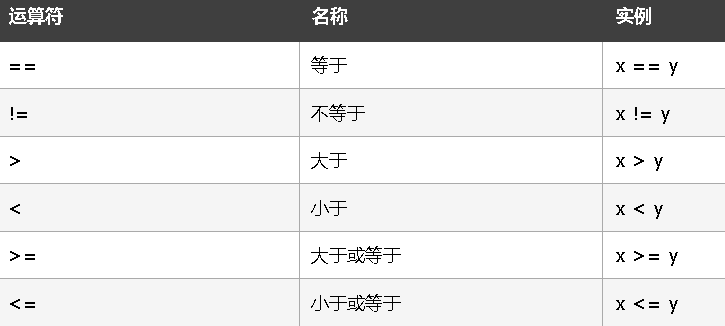
Python 比较运算符
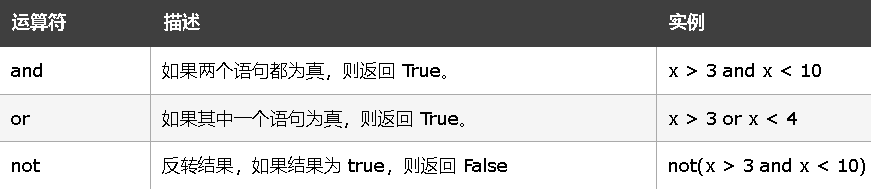
Python 逻辑运算符
Python 身份运算符

Python 成员运算符

python 四种集合数据类型:
列表(List)是一种有序和可更改的集合。允许重复的成员。
元组(Tuple)是一种有序且不可更改的集合。允许重复的成员。
集合(Set)是一个无序和无索引的集合。没有重复的成员。
词典(Dictionary)是一个无序,可变和有索引的集合。没有重复的成员。
列表 list
#创建列表:
thislist = ["apple", "banana", "cherry"]
print(thislist)

#打印列表的第二项:
thislist = ["apple", "banana", "cherry"]
print(thislist[1])

#负的索引 从尾部开始
thislist = ["apple", "banana", "cherry"]
print(thislist[-1])

#索引范围
#通过指定范围的起点和终点来指定索引范围。
#返回第三、第四、第五项:
thislist = ["apple", "banana", "cherry", "orange", "kiwi", "melon", "mango"]
print(thislist[2:5])

#此例将返回从索引 -4(包括)到索引 -1(排除)的项目:
thislist = ["apple", "banana", "cherry", "orange", "kiwi", "melon", "mango"]
print(thislist[-4:-1])

#通过索引更改项目值
thislist = ["apple", "banana", "cherry"]
thislist[1] = "mango"
print(thislist)

#使用 for 循环遍历列表
thislist = ["apple", "banana", "cherry"]
for x in thislist:
  print(x)

#检查列表中是否存在 “apple”:
thislist = ["apple", "banana", "cherry"]
if "apple" in thislist:
  print("Yes, 'apple' is in the fruits list")

#如需确定列表中有多少项,请使用 len() 方法:
thislist = ["apple", "banana", "cherry"]
print(len(thislist))

#使用 append() 方法追加项目:
thislist = ["apple", "banana", "cherry"]
thislist.append("orange")
print(thislist)

#指定的索引处添加项目,请使用 insert() 方法:
thislist = ["apple", "banana", "cherry"]
thislist.insert(1, "orange")
print(thislist)

#remove() 方法删除指定的项目:
thislist = ["apple", "banana", "cherry"]
thislist.remove("banana")
print(thislist)

#pop() 方法删除指定的索引(如果未指定索引,则删除最后一项):
#这个其实叫 弹出 删除原列表项 并返回删除项
thislist = ["apple", "banana", "cherry"]
thislist.pop()
print(thislist)

#del 关键字删除指定的索引:
thislist = ["apple", "banana", "cherry"]
del thislist[0]
print(thislist)

#del 关键字也能完整地删除列表:
thislist = ["apple", "banana", "cherry"]
del thislist

#clear() 方法清空列表:
thislist = ["apple", "banana", "cherry"]
thislist.clear()
print(thislist)

#使用 copy() 方法来复制列表:
#这种方法 是真复制了一份,而不是原来的索引  也叫深拷贝
#如果使用 list2 = list1 来复制列表 得到的仅仅是索引
thislist = ["apple", "banana", "cherry"]
mylist = thislist.copy()
print(mylist)
print(id(mylist))
print(id(thislist))

#制作副本的另一种方法是使用内建的方法 list()。
#这种也是深拷贝
thislist = ["apple", "banana", "cherry"]
mylist = list(thislist)
print(mylist)
print(id(thislist))
print(id(mylist))

#使用 + 运算符 合并两个列表
list1 = ["a", "b" , "c" , 3]
list2 = [1, 2, 3, 'a']
list3 = list1 + list2
print(list3)

#把 list2 追加到 list1 中:
list1 = ["a", "b" , "c"]
list2 = [1, 2, 3]
for x in list2:
  list1.append(x)
print(list1)

#使用 extend() 方法将 list2 添加到 list1 的末尾:
list1 = ["a", "b" , "c"]
list2 = [1, 2, 3]
list1.extend(list2)
print(list1)

#使用 list() 构造函数创建一个新列表。
thislist = list(("apple", "banana", "cherry")) # 请注意双括号
print(thislist)
元组(Tuple)
元组是有序且不可更改的集合。在 Python 中,元组是用圆括号编写的。
thistuple = ("apple", "banana", "cherry")
print(thistuple)

#打印元组中的第二个项目:
thistuple = ("apple", "banana", "cherry")
print(thistuple[1])

#打印元组的最后一个项目:
thistuple = ("apple", "banana", "cherry")
print(thistuple[-1])

#返回元组的 下标为 2 3 4 的元素 包前不包后
thistuple = ("apple", "banana", "cherry", "orange", "kiwi", "melon", "mango")
print(thistuple[2:5])

#返回从索引 -4(包括)到索引 -1(排除)的项目:
thistuple = ("apple", "banana", "cherry", "orange", "kiwi", "melon", "mango")
print(thistuple[-4:-1])

#如果想更改元组 可以先转换成list 改完再转回来
x = ("apple", "banana", "cherry")
y = list(x)
y[1] = "kiwi"
x = tuple(y)
print(x)

#使用 for 循环遍历元组项目。
thistuple = ("apple", "banana", "cherry")
for x in thistuple:
  print(x)

#检查元组中是否存在 "apple":
thistuple = ("apple", "banana", "cherry")
if "apple" in thistuple:
  print("Yes, 'apple' is in the fruits tuple")

#打印元组中的项目数量:len()
thistuple = ("apple", "banana", "cherry")
print(len(thistuple))

#元组一旦创建,您就无法向其添加项目。元组是不可改变的。
thistuple = ("apple", "banana", "cherry")
thistuple[3] = "orange" # 会引发错误
print(thistuple)

#单项元组,别忘了逗号:
thistuple = ("apple",)
print(type(thistuple))

#不是元组
thistuple = ("apple")
print(type(thistuple))

#del 关键字可以完全删除元组:
thistuple = ("apple", "banana", "cherry")
del thistuple
print(thistuple) # 这会引发错误,因为元组已不存在。

#使用 + 运算符 合并两个元组
tuple1 = ("a", "b" , "c")
tuple2 = (1, 2, 3)
tuple3 = tuple1 + tuple2
print(tuple3)

#使用 tuple() 构造函数来创建元组。
thistuple = tuple(("apple", "banana", "cherry")) # 请注意双括号
print(thistuple)
集合(Set)
集合是无序和无索引的集合。在 Python 中,集合用花括号编写。
集合一旦创建,您就无法更改项目,但是您可以添加新项目。
#创建集合:
thisset = {"apple", "banana", "cherry"}
print(thisset)

#遍历集合,并打印值:
thisset = {"apple", "banana", "cherry"}
for x in thisset:
  print(x)

#检查 set 中是否存在 “banana”:
thisset = {"apple", "banana", "cherry"}
print("banana" in thisset)

#将一个项添加到集合,请使用 add() 方法。
thisset = {"apple", "banana", "cherry"}
thisset.add("orange")
print(thisset)

#使用 update() 方法将多个项添加到集合中:
thisset = {"apple", "banana", "cherry"}
thisset.update(["orange", "mango", "grapes"])
print(thisset)

#要确定集合中有多少项,请使用 len() 方法。
thisset = {"apple", "banana", "cherry"}
print(len(thisset))

#使用 remove() 方法来删除 “banana”:
thisset = {"apple", "banana", "cherry"}
thisset.remove("banana")
print(thisset)

#使用 discard() 方法来删除 “banana”:
thisset = {"apple", "banana", "cherry"}
thisset.discard("banana")
print(thisset)

#使用 pop() 方法删除最后一项:
#pop() 方法的返回值是被删除的项目。
#set 是无序的,因此您不会知道被删除的是什么项目。
#这个可以用作随机取值
thisset = {"apple", "banana", "cherry"}
x = thisset.pop()
print(x)
print(thisset)

#clear() 方法清空集合:
thisset = {"apple", "banana", "cherry"}
thisset.clear()
print(thisset)

#del 彻底删除集合:
thisset = {"apple", "banana", "cherry"}
del thisset
print(thisset) #这里会报错

#合并两个集合 union() 方法返回一个新集合,其中包含两个集合中的所有项目:
set1 = {"a", "b" , "c"}
set2 = {1, 2, 3}
set3 = set1.union(set2)
print(set3)

#update() 方法将 set2 中的项目插入 set1 中:
set1 = {"a", "b" , "c"}
set2 = {1, 2, 3}
set1.update(set2)
print(set1)

#使用 set() 构造函数来创建集合:
thisset = set(("apple", "banana", "cherry")) # 请留意这个双括号
print(thisset)
字典(Dictionary)
字典是一个无序、可变和有索引的集合。在 Python 中,字典用花括号编写,拥有键和值。
#创建并打印字典:
thisdict =  {
  "brand": "Porsche",
  "model": "911",
  "year": 1963
}
print(thisdict)

#获取 "model" 键的值:
x = thisdict["model"]

#获取 "model" 键的值:
#还有一个名为 get() 的方法会给你相同的结果:
x = thisdict.get("model")

#把 "year" 改为 2019:
thisdict =  {
  "brand": "Porsche",
  "model": "911",
  "year": 1963
}
thisdict["year"] = 2019

#使用 for 循环遍历字典。
#这里只打印出来得是健
for x in thisdict:
  print(x)

#逐个打印字典中的所有值:
for x in thisdict:
  print(thisdict[x])

#还可以使用 values() 函数返回字典的值:
for x in thisdict.values():
  print(x)

#通过使用 items() 函数遍历键和值:
for x, y in thisdict.items():
  print(x, y)

#检查字典中是否存在 "model":
thisdict =  {
  "brand": "Porsche",
  "model": "911",
  "year": 1963
}
if "model" in thisdict:
  print("Yes, 'model' is one of the keys in the thisdict dictionary")

#要确定字典有多少项目(键值对),请使用 len() 方法。
print(len(thisdict))

#添加项目 通过使用新的索引键并为其赋值,可以将项目添加到字典中:
thisdict =  {
  "brand": "Porsche",
  "model": "911",
  "year": 1963
}
thisdict["color"] = "red"
print(thisdict)

#pop() 方法删除具有指定键名的项:
thisdict =  {
  "brand": "Porsche",
  "model": "911",
  "year": 1963
}
thisdict.pop("model")
print(thisdict)

#popitem() 方法删除最后插入的项目(在 3.7 之前的版本中,删除随机项目):
thisdict =  {
  "brand": "Porsche",
  "model": "911",
  "year": 1963
}
thisdict.popitem()
print(thisdict)

#del 关键字删除具有指定键名的项目:
thisdict =  {
  "brand": "Porsche",
  "model": "911",
  "year": 1963
}
del thisdict["model"]
print(thisdict)

#del 关键字也可以完全删除字典:
thisdict =  {
  "brand": "Porsche",
  "model": "911",
  "year": 1963
}
del thisdict
print(thisdict) #this 会导致错误,因为 "thisdict" 不再存在。

#clear() 关键字清空字典:
#仅仅是清空 而不删除字典本身
thisdict =  {
  "brand": "Porsche",
  "model": "911",
  "year": 1963
}
thisdict.clear()
print(thisdict)

#复制字典 使用 copy() 方法来复制字典:
#真复制了一个副本,深拷贝 而不是简单的拿到了内存索引
thisdict =  {
  "brand": "Porsche",
  "model": "911",
  "year": 1963
}
mydict = thisdict.copy()
print(id(mydict))
print(id(thisdict))
print(mydict)

#制作副本的另一种方法是使用内建方法 dict()。
#使用 dict() 方法创建字典的副本:
#两样是复制了副本
thisdict =  {
  "brand": "Porsche",
  "model": "911",
  "year": 1963
}
mydict = dict(thisdict)
print(id(mydict))
print(id(thisdict))
print(mydict)

#嵌套字典
#词典也可以包含许多词典,这被称为嵌套词典。
#相当于二级字典
myfamily = {
  "child1" : {
    "name" : "Phoebe Adele",
    "year" : 2002
  },
  "child2" : {
    "name" : "Jennifer Katharine",
    "year" : 1996
  },
  "child3" : {
    "name" : "Rory John",
    "year" : 1999
  }
}
print(myfamily)

child1 = {
  "name" : "Phoebe Adele",
  "year" : 2002
}
child2 = {
  "name" : "Jennifer Katharine",
  "year" : 1996
}
child3 = {
  "name" : "Rory John",
  "year" : 1999
}

myfamily = {
  "child1" : child1,
  "child2" : child2,
  "child3" : child3
}

#也可以使用 dict() 构造函数创建新的字典:
thisdict = dict(brand="Porsche", model="911", year=1963)
# 请注意,关键字不是字符串字面量
# 请注意,使用了等号而不是冒号来赋值
print(thisdict)
if else 语句
Python 支持来自数学的常用逻辑条件:
#等于:a == b
#不等于:a != b
#小于:a < b
#小于等于:a <= b
#大于:a > b
#大于等于:a >= b

a = 66
b = 200
if b > a:
  print("b is greater than a")

#elif 关键字
a = 66
b = 66
if b > a:
  print("b is greater than a")
elif a == b:
  print("a and b are equal")

#else 关键字
a = 200
b = 66
if b > a:
  print("b is greater than a")
elif a == b:
  print("a and b are equal")
else:
  print("a is greater than b")

#简写 If 只有一条语句
a = 200
b = 66
if a > b: print("a is greater than b")

#简写 If ... else
a = 200
b = 66
print("A") if a > b else print("B")

#还可以在同一行上使用多个 else 语句:
#比较奇怪的语法
a = 200
b = 66
print("A") if a > b else print("=") if a == b else print("B")

#and 关键字是一个逻辑运算符,用于组合条件语句:
a = 200
b = 66
c = 500
if a > b and c > a:
  print("Both conditions are True")

#or 关键字也是逻辑运算符,用于组合条件语句:
a = 200
b = 66
c = 500
if a > b or a > c:
  print("At least one of the conditions is True")

#嵌套 If 可以在 if 语句中包含 if 语句,这称为嵌套 if 语句。
#这里要注意缩进
x = 52
if x > 10:
  print("Above ten,")
  if x > 20:
    print("and also above 20!")
  else:
    print("but not above 20.")

#pass 语句 if 语句不能为空,但是如果您处于某种原因写了无内容的 if 语句,请使用 pass 语句来避免错误。
a = 66
b = 200
if b > a:
  pass
while 循环
i = 1
while i < 7:
  print(i)
  i += 1

#break 语句 跳出循环
i = 1
while i < 7:
  print(i)
  if i == 3:
    break
  i += 1

#continue 语句
i = 0
while i < 7:
  i += 1
  if i == 3:
    continue
  print(i)

#else 语句
#通过使用 else 语句,当条件不再成立时,我们可以运行一次代码块:
i = 1
while i < 6:
  print(i)
  i += 1
else:
  print("i is no longer less than 6")
Python For 循环
#for 循环用于迭代序列(即列表,元组,字典,集合或字符串)。
#通过使用 for 循环,我们可以为列表、元组、集合中的每个项目等执行一组语句。
fruits = ["apple", "banana", "cherry"]
for x in fruits:
  print(x)

#循环遍历单词 "banana" 中的字母:
for x in "banana":
  print(x)

#如果 x 是 "banana",则退出循环:
fruits = ["apple", "banana", "cherry"]
for x in fruits:
  print(x)
  if x == "banana":
    break

#当 x 为 "banana" 时退出循环,但这次在打印之前中断:
fruits = ["apple", "banana", "cherry"]
for x in fruits:
  if x == "banana":
    break
  print(x)

#通过使用 continue 语句,我们可以停止循环的当前迭代,并继续下一个:
fruits = ["apple", "banana", "cherry"]
for x in fruits:
  if x == "banana":
    continue
  print(x)

#range() 函数
#如需循环一组代码指定的次数,我们可以使用 range() 函数,
#如需循环一组代码指定的次数,我们可以使用 range() 函数,
for x in range(10):
  print(x)

#使用起始参数:
for x in range(3, 10):
  print(x)

#使用 3 递增序列(默认值为 1):
#间隔
for x in range(3, 50, 6):
  print(x)

#For 循环中的 Else
#for 循环中的 else 关键字指定循环结束时要执行的代码块:
#打印 0 到 9 的所有数字,并在循环结束时打印一条消息:
for x in range(10):
  print(x)
else:
  print("Finally finished!")

#嵌套循环
#打印每个水果的每个形容词:
adj = ["red", "big", "tasty"]
fruits = ["apple", "banana", "cherry"]
for x in adj:
  for y in fruits:
    print(x, y)

#pass 语句
#for 语句不能为空,但是如果您处于某种原因写了无内容的 for 语句,请使用 pass 语句来避免错误。
for x in [0, 1, 2]:
  pass
Python 函数
def my_function():
  print("Hello from a function")

def my_function():
  print("Hello from a function")
my_function()

def my_function(fname):
  print(fname + " Gates")
my_function("Bill")
my_function("Steve")
my_function("Elon")

#函数默认值
def my_function(country = "japan"):
  print("I am from " + country)
my_function("Sweden")
my_function("India")
my_function()
my_function("Brazil")

#以 List 传参
def my_function(food):
  for x in food:
    print(x)
fruits = ["apple", "banana", "cherry"]
my_function(fruits)

#返回值
#python里可以返回多个值
def my_function(x):
  return 5 * x
print(my_function(3))
print(my_function(5))
print(my_function(9))

#关键字参数
#这样不必在意参数的顺序
def my_function(child3, child2, child1):
  print("The youngest child is " + child3)
my_function(child1 = "Phoebe", child2 = "Jennifer", child3 = "Rory")

#任意参数数量
#如果参数数目未知,请在参数名称前添加 *:
def my_function(*kids):
  print("The youngest child is " + kids[2])
my_function("Phoebe", "Jennifer", "Rory")

#pass 语句
#函数定义不能为空,但是如果您出于某种原因写了无内容的函数定义,请使用 pass 语句来避免错误。
def myfunction:
  pass

#递归函数
def tri_recursion(k):
  if(k>0):
    result = k+tri_recursion(k-1)
    print(result)
  else:
    result = 0
  return result

tri_recursion(6)
Python Lambda表达式
lambda 函数是一种小的匿名函数。
lambda 函数可接受任意数量的参数,但只能有一个表达式
语法: lambda arguments : expression
#一个 lambda 函数,它把作为参数传入的数字加 10,然后打印结果
x = lambda a : a + 10
print(x(5)) #15

#一个 lambda 函数,它把参数 a 与参数 b 相乘并打印结果:
x = lambda a, b : a * b
print(x(5, 6))

#一个 lambda 函数,它把参数 a、b 和 c 相加并打印结果:
x = lambda a, b, c : a + b + c
print(x(5, 6, 2))

# lambda 用作另一个函数内的匿名函数时
def myfunc(n):
  return lambda a : a * n
#这里有点不好理解 这里是返回了一个lambda表达式
mydoubler = myfunc(2)
#这里是调用返回的lambda表达式
print(mydoubler(11))    #22

#高级点的函数内部使用lambda
def myfunc(n):
  return lambda a : a * n

mydoubler = myfunc(2)
mytripler = myfunc(3)

print(mydoubler(11))
print(mytripler(11))